PlayerUi
UI documents the server opens on a player's screen (player.ui): an RML
client file that the server
fills in by element id, and hears clicks, changes and form submits from.
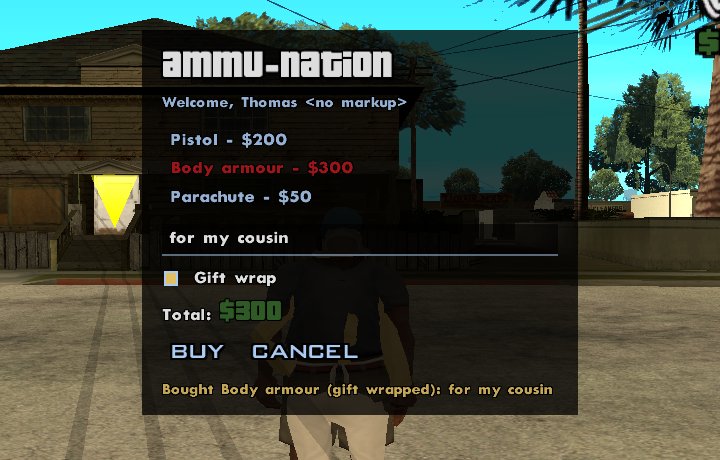
Layouts are RML and RCSS, styled like any other: see Styling and layouts.
Server documents (player.ui) |
Client scripts (sagl.ui) |
|
|---|---|---|
| Logic runs | On the server: every click is a round trip | In the game, instantly |
| Good for | Shops, dialogs, forms, menus that change server state | HUDs, animation, live updates, anything reacting per frame |
| Needs a client script | No | Yes |
| Survives client script reloads | Yes | No |
Both work with the same layouts and the same element methods, so a document can start on the server and move to a client script when it outgrows it.
PlayerUi
open(file, options?)
Opens an RML client file on their screen. Its relative links (images,
stylesheets) resolve beside it; /sagl/ui/theme/base.rcss is SAGL's theme.
| Parameter | Type | Description |
|---|---|---|
file |
string |
The client file, e.g. "ui/shop.rml". |
options |
UiOpenOptions |
Optional. |
Returns the UiDocument, straight away: changes made
before it reaches the player are applied in order.
Throws ReferenceError if there's no such client file; RangeError
past 16 open documents.
documents
The documents open on their screen now.
closeAll()
Closes every document the server has open on their screen.
UiOpenOptions
| Field | Type | Default | Description |
|---|---|---|---|
input |
boolean |
true |
Takes the player's input while shown. false for display-only panels. |
cursor |
boolean |
input |
Shows the mouse cursor. |
keyboard |
boolean |
input |
Keys go to the document. |
gamepad |
boolean |
input |
The gamepad moves focus (A activates, B backs out). |
movement |
boolean |
false |
Leaves the player's movement to the game. |
escapeCloses |
boolean |
true |
Esc (or gamepad B) closes it, and its close handlers run. |
UiDocument
What open returns. The setters work on the document's elements by id
and return the document, so calls chain. Changes to a closed document are
ignored.
| Member | Description |
|---|---|
id |
Its number, unique per player. |
file |
The client file it was opened from. |
player |
Whose screen it's on. |
open |
boolean: false once it's closed (by close(), by the player, or by them leaving). |
setText(id, text)
Sets an element's text. It's shown as text: < and & are not markup.
setHtml(id, rml)
Replaces an element's contents with RML, up to 5 KB per call.
shop.setHtml("items", items.map((i) => `<div class="item" id="${i.id}">${i.name} - $${i.price}</div>`).join(""));
setValue(id, value)
A form control's value: <input>, <select>, <textarea>.
setChecked(id, checked?)
Checks (the default) or unchecks a checkbox or radio button.
setClass(id, name, on?)
Adds (on, the default) or removes a class.
setAttribute(id, name, value)
Sets an attribute, or removes it with null. Not id.
focus(id)
Gives an element keyboard and gamepad focus.
show(), hide()
Hides it (and gives the player's input back) without closing it, and shows it again.
close()
Closes it for good. Its close handlers don't run: you closed it.
on(type, id?, handler)
on(type: UiEventType, handler: (e: UiEvent) => void): this
on(type: UiEventType, id: string, handler: (e: UiEvent) => void): this
Handles events from the whole document, or from one element (and what's inside it). The player's game only sends the types something listens for.
| Parameter | Type | Description |
|---|---|---|
type |
string |
click, change, submit, keydown, focus, blur, mouseover, mouseout, or close (the player closed it). |
id |
string |
Optional: only events from this element. |
handler |
function |
Gets a UiEvent. |
shop.on("click", "cancel", () => shop.close());
shop.on("change", "note", (e) => { if (e.enter) save(e.value); });
shop.on("submit", (e) => buy(player, e.fields.item, e.fields.gift === "yes"));
Warning
Events come from the player's game, so treat them like any other client input: check that they can afford it, that they're still in the shop, and so on. Players send them at a limited rate.
off(type, handler?)
Removes a handler, or every handler of that type.
onClose(fn)
The same as on("close", fn): the player closed it with Esc.
UiEvent
| Field | Type | Description |
|---|---|---|
type |
string |
The event type. |
document, player |
Where it came from. | |
id |
string |
The nearest element with an id ("" for none). |
value |
string |
A form control's value (change, submit, clicks on controls). |
checked |
boolean |
Checkboxes and radio buttons. |
enter |
boolean |
change from a text input: Enter was pressed in it. |
key |
number |
keydown: RmlUi's key identifier (KI_A 12 ... KI_Z 37, KI_0 2 ... KI_9 11). |
fields |
Record<string, string> |
submit: the form's controls by name (unchecked boxes left out), plus submit: the submit button's value. |
Forms
A <form> submits when the player presses an <input type="submit"> in it.
(In RmlUi, <button> is only a styled element: it clicks, but doesn't
submit.) The submit input shows its value as its label.
<rml>
<head>
  <link type="text/rcss" href="/sagl/ui/theme/base.rcss"/>
  <style>body { position: absolute; left: 50%; top: 18%; width: 440dp; margin-left: -220dp; }</style>
</head>
<body class="panel">
  <h1 id="title">Shop</h1>
  <div class="list" id="items"></div>
  <form>
    <input class="text" type="text" name="note" id="note"/>
    <div><input type="checkbox" name="gift" id="gift" value="yes"/> Gift wrap</div>
    <input type="submit" class="button" value="Buy"/>
    <button id="cancel">Cancel</button>
  </form>
  <span class="status" id="status"></span>
</body>
</rml>
See the shop menu example for the server side.