UI documents and pages
Client scripts build UI with RML and RCSS, RmlUi's HTML and CSS (see Styling and layouts). They get three things:
- Documents: their own screens, HUDs and dialogs, over the game.
- Pause menu pages: a page of their own in the pause menu, after SAGL's own.
- The message box: SAGL's, with their title, text and buttons.
Scripts can't reach SAGL's own UI (the pause menu's own pages, the message box's insides); they work on their own elements only, by id.
Documents
const hud = sagl.ui.open(`
  <rml>
  <head>
    <link type="text/rcss" href="/sagl/ui/theme/base.rcss"/>
    <style>
      body { position: absolute; right: 24dp; top: 210dp; width: 220dp; }
      .panel { display: block; width: 192dp; padding: 10dp 14dp; }
    </style>
  </head>
  <body><div class="panel">Cops <span id="cops">0</span></div></body>
  </rml>`, { input: false });

hud.setText("cops", 12);
Or from a client file, where relative links (images, styles) resolve beside it:
Options
| Option | Default | |
|---|---|---|
input |
true | Takes the player's input while shown. false for HUDs. |
cursor |
input |
Shows the mouse cursor. |
keyboard |
input |
Keys go to the document. |
gamepad |
input |
The gamepad moves focus (A activates, B backs out). |
movement |
false | Leaves the player's movement to the game (walk with a phone open). |
escapeCloses |
true | Esc (or gamepad B) closes it. |
Methods
Documents and pages share these; each returns the document or page, so calls chain.
setText(id, text) |
An element's text (escaped). |
setHtml(id, rml) |
An element's contents, as RML. |
setValue(id, value), getValue(id) |
Form controls' values. |
isChecked(id) |
Checkboxes and radio buttons. |
setClass(id, name, on?) |
Adds or removes a class. |
setAttribute(id, name, value) |
null removes it. |
focus(id) |
|
on(type, [id,] handler) |
Events, from the whole document or one element: click, change, submit, keydown, focus, blur, mouseover, mouseout. The handler gets { type, id, value, key, checked }; key is RmlUi's key identifier (KI_A is 12 ... KI_Z 37, KI_0 2 ... KI_9 11). |
off(type, handler?) |
Documents also have show(), hide(), close(), onClose(fn) and
open (false once closed).
const menu = sagl.ui.openFile("ui/garage.rml");
menu.on("click", "buy", () => sagl.emit("garage", { buy: menu.getValue("car") }));
menu.on("keydown", (e) => { if (e.key === 28) menu.close(); });   // 28: Q (RmlUi KI_Q)
menu.onClose(() => sagl.emit("garage", { closed: true }));
Pause menu pages
const shop = sagl.ui.pauseMenu.addPage("Shop", `
  <h2 class="first">Ammu-Nation</h2>
  <span class="subtitle">Pick a weapon. It's taken from your cash.</span>
  <div class="list">
    <div class="item" id="pistol">Pistol - $200</div>
    <div class="item" id="shotgun">Shotgun - $600</div>
  </div>
  <span class="status" id="status"></span>`);

shop.on("click", (e) => {
  if (e.id) sagl.emit("shop", { buy: e.id });
});
shop.onShow(() => shop.setText("status", ""));
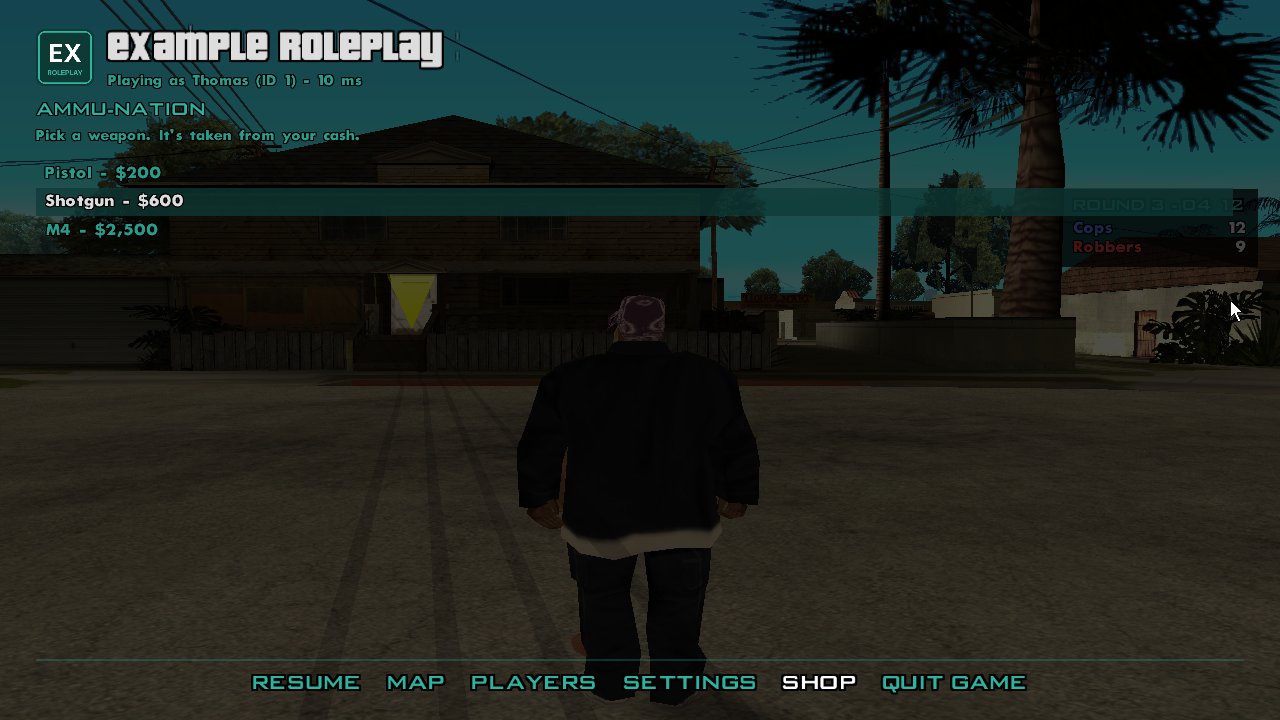
The page's title goes in the options row, before Quit Game. The RML is the
page's body: it's styled by the pause menu's theme (so h2, .subtitle,
.list, button look like SAGL's own). Pages have remove() and
onShow(fn).
The message box
const answer = await sagl.ui.messageBox({
  title: "Pay 'n' Spray",
  text: "Respray your car for $100? It'll lose two wanted stars.",
  buttons: ["No", "Yes"],
});
if (answer === "Yes") sagl.emit("spray");
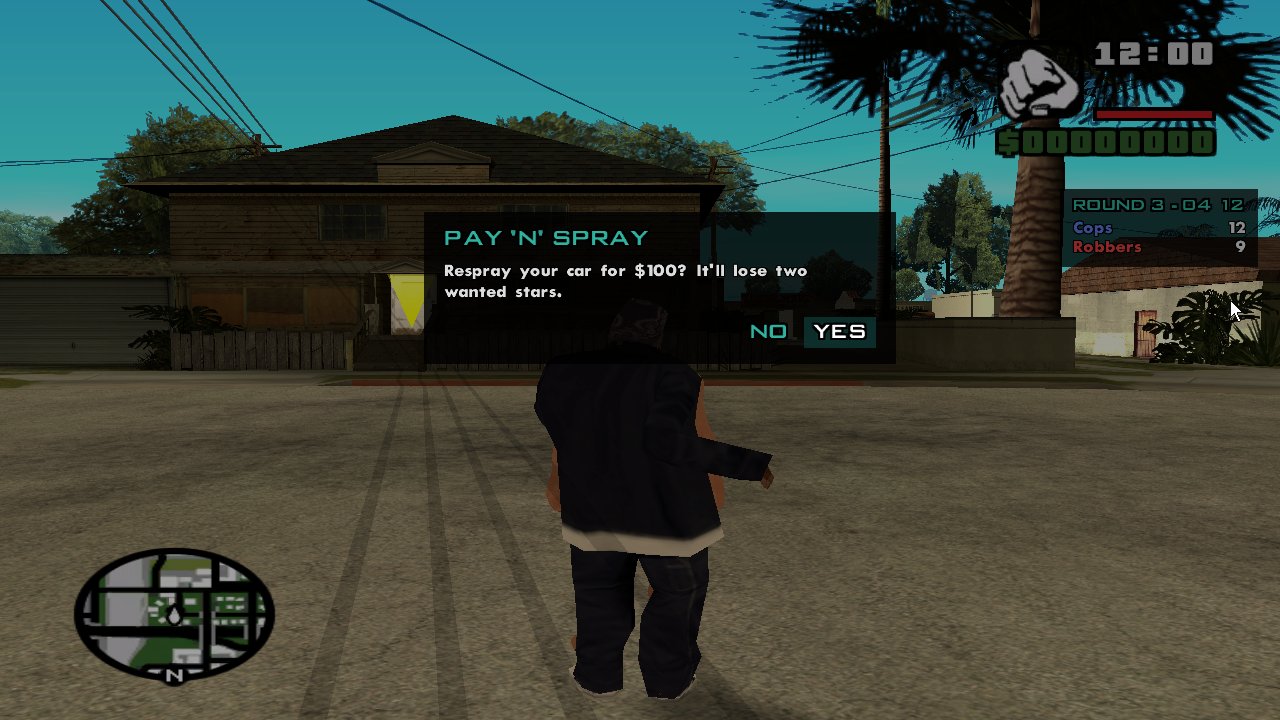
It resolves to the chosen button's label, or null if the player
dismissed it (Esc). The last button is the default. Boxes queue: one shows
at a time.