PlayerHud
player.hud: one player's mission HUD. Radar blips with the game's 3D
markers, objective text, big text, timers and counters, and the mission
result screen. Everything here is for that player alone and is cleared
when they leave.
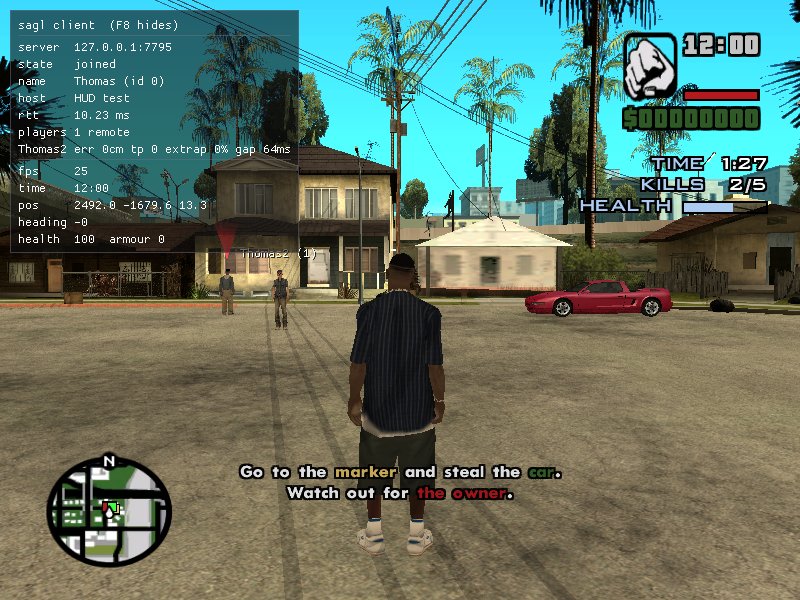
The game's HUD
set(parts)
player.hud.set(parts: { visible?; radar?; areaNames?; vehicleNames?; clock?; health?; armour?; chat? }): void
player.hud.parts: { visible, radar, areaNames, vehicleNames, clock, health, armour, chat }
Shows (true) or hides (false) parts of the game's HUD for them; parts
left out stay as they are. visible: false hides all of it (radar, area
and vehicle names too), as for a login screen or a cutscene. health and
armour are the game's bars in the top right, which you might hide for a
HUD of your own (see the client's <sagl-map> radar). A client
script can hide parts as well (sagl.hud.set):
a part shows only if neither hides it. chat: false hides the chat (it
isn't part of visible, which is the game's own HUD).
A radar of a script's own follows the server's: the <sagl-map> radar hides
itself while the server hides the radar (or all of it), and a script can
hear the change with
sagl.hud.onChange to hide the rest of its
HUD.
player.hud.set({ visible: false });               // nothing over the shot
player.hud.set({ visible: true, clock: false });  // back, without the clock
Blips
blip(target, options?)
A blip on their radar.
- On a spot: with the game's cylinder marker on the ground.
- On a ped, vehicle or player: an arrow over them, following them. While they're dead (or it's wrecked), it doesn't show, as in the game.
It shows on the pause menu's map too (unless it's display: "marker").
| Parameter | Type | Description |
|---|---|---|
target |
Vector3 | Ped | Vehicle | Player |
What it marks. |
options.color |
BlipColor |
The game's "red", "green", "blue", "white", "yellow", "purple", "cyan", "threat", "destination", or "#RRGGBB[AA]". Default "destination" for a spot, "blue" otherwise. |
options.display |
"both" | "blip" | "marker" |
The radar blip, the 3D marker, or both (default). |
options.scale |
number |
1-4. For a spot, also the marker's size. |
options.pulse |
boolean |
Dims and brightens twice a second, on the radar and maps: a phone ringing. |
options.shortRange |
boolean |
Spots only: on the radar only when near, never on its edge, like the game's shop and garage icons. |
options.sprite |
number |
Spots only: one of the game's radar sprites (1-63) instead of a plain blip. |
Returns the Blip.
const drop = player.hud.blip({ x: 1800, y: -2575, z: 13.5 });          // yellow marker
const target = player.hud.blip(dealer, { color: "red" });              // red arrow over him
player.hud.blip(getawayCar, { color: "#40ff40", display: "blip" });   // radar only
Blip
| Member | Description |
|---|---|
set(options) |
Changes its options. Returns it. |
remove() |
Takes it off their radar. |
Text
objective(text, ms?)
The objective, at the bottom of their screen in the game's mission text style. It shows whatever their Subtitles option is set to.
| Parameter | Type | Description |
|---|---|---|
text |
string |
Up to 255 characters. The game's codes work: ~r~ red, ~g~ green, ~b~ blue, ~y~ yellow, ~p~ purple, ~w~ back to white, ~n~ a new line. |
ms |
number |
How long it stays. Default: about as long as reading it takes; Infinity until replaced or cleared. |
clearObjective()
help(text, ms?), clearHelp()
The game's help box at the top left, where it shows its hints ("Press F to
..."). It stays for ms: by default about as long as reading it takes, and
Infinity keeps it until it's replaced or cleared. Game codes and
gxt() work. While an interaction is in reach,
its prompt shows over it.
gameText(text, ms?, style?)
The game's own big text, as SA-MP's GameTextForPlayer, in its seven styles
(GameTextStyle, SA-MP's numbers): 0 Middle (mission passed), 1
BottomRight, 2 WhiteMiddle (stays until replaced), 3 MiddleSmaller
(the default), 4 MiddleSmallerHigher, 5 WhiteMiddleSmaller, 6
LightBlueTop. Game codes (~r~, ~n~...) and gxt() work; ms default
3000. Another of the same style replaces it.
notice(text, ms?)
A notice in the middle of their screen, as the game's garages and shops
give it ("New engine and paint job: $100"), in the game's own style, for
ms (default 4000). Game codes and gxt() work.
bigText(text, ms?)
Big Pricedown text in the middle of their screen.
Timers and counters
Shown on the right under their money, as the game's own are.
timer(label, ms, options?)
A clock counting down from ms, or up from it with countUp. Their game
runs it; set value to correct it.
const clock = player.hud.timer("Time", 90_000);
setTimeout(() => mission.fail("Out of time."), 90_000);
counter(label, options?)
counter(label: string, options?: { value?: number; max?: number; bar?: boolean; color?: MapColor }): HudCounter
A number (shown as value/max when max is given), or a bar (bar: true,
value of max).
const kills = player.hud.counter("Kills", { value: 0, max: 5 });
kills.value++;
const health = player.hud.counter("Truck", { value: 1000, max: 1000, bar: true });
HudCounter
| Member | Description |
|---|---|
value |
Get or set: the number, the time left (ms) for a timer, or how full a bar is. |
label |
Set: changes its label. |
remove() |
Takes it off their HUD. |
Result screens
missionPassed(subtitle?)
"MISSION PASSED!" with the game's tune, and subtitle under it in the
same Pricedown, as the game shows the reward.
missionFailed(subtitle?)
"MISSION FAILED!", with subtitle (why) under it in smaller text.
missionResult(title, subtitle?)
A result screen of your own, in the same style.
The screens use the server's branding
colours. A client script can replace them with its own; see
sagl.ui.onMissionResult.