ScreenDraw
Drawing on screen, SA-MP textdraw style: text, boxes and images, pinned to a corner, an edge or the centre of the screen.
| Where | Who sees it |
|---|---|
player.draw |
That player. |
server.draw |
Everyone, including players who join later. |
sagl.draw (client scripts) |
That game, apart from the server's. See sagl. |
For anything beyond a few lines and boxes (menus, forms, styled panels), use UI documents from a client script.
Placement
x and y are offsets from an anchor, a point on the screen:
top-left ─────── top ─────── top-right
   │                             │
 left          center          right
   │                             │
bottom-left ── bottom ── bottom-right
Offsets, sizes and font sizes are in units of 1/448 of the screen
height, horizontally too, so nothing stretches: a 50×50 box is square
on 4:3, 16:9 and ultrawide alike, and the screen is always 448 units tall.
Use negative offsets to go left of or above the anchor (from right,
top-right or bottom-right, x: -10 is 10 units in from the edge).
The default anchor is top-left. align decides which edge of the text
or image sits on x, so for the middle of the screen use
{ anchor: "center", align: "center" }.
| Option | Type | Description |
|---|---|---|
anchor |
"top-left" | "top" | "top-right" | "left" | "center" | "right" | "bottom-left" | "bottom" | "bottom-right" | "canvas" |
Default "top-left". |
layer |
number |
Higher draws on top. |
"canvas" is SA-MP's own coordinates: a 640×448 canvas stretched over
the whole screen, so x: 320 is always the middle. Good for porting SA-MP
textdraws; shapes stretch on widescreen, as they do in SA-MP.
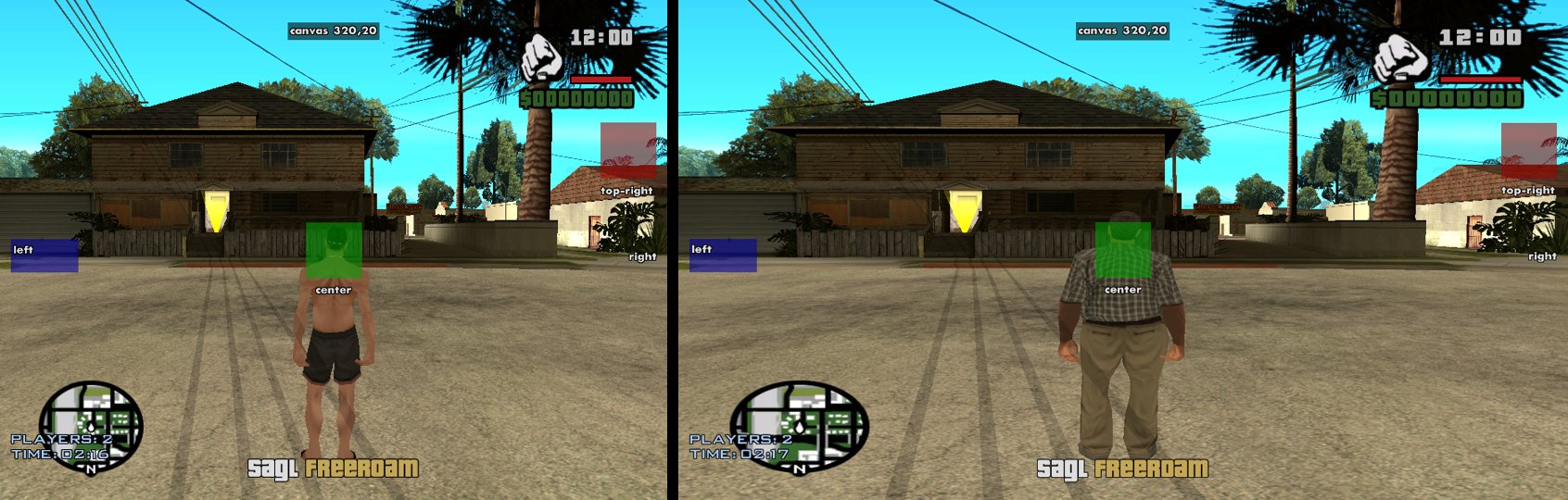
server.draw.text("SAGL ~y~Freeroam", 0, -38, { anchor: "bottom", align: "center", font: "pricedown", size: 22, outline: 1 });
server.draw.box(-60, 110, 50, 50, "#a0000090", { anchor: "top-right" });
player.draw.text("Score: 0", 320, 20, { anchor: "canvas", align: "center" });  // SA-MP style
text(text, x, y, options?)
Text with its top at y; align decides whether x is its left edge,
centre or right edge.
| Option | Type | Description |
|---|---|---|
font |
"pricedown" | "sa-menu" | "sa-text" | "sa-gothic" | "Inter" |
Default "sa-text", the game's subtitle font. |
size |
number |
Text height, in screen-height units. Default 12. |
color |
"#RRGGBB[AA]" | 0xRRGGBBAA |
Default white. |
outline |
number |
A black outline this thick; the game's look is about 1. |
shadow |
number |
A black drop shadow this far, instead of an outline. |
outlineColor |
MapColor |
The outline's (or shadow's) colour instead of black, e.g. 0x1e3c78ff. |
box, boxPadding |
colour, number |
A box behind the text. |
align |
"left" | "center" | "right" |
Default "left". |
width |
number |
Wrap at this width. Left out: one line. |
anchor, layer |
See Placement. |
The game's codes work: ~r~ ~g~ ~b~ ~y~ ~p~ ~w~, ~n~ for a new line.
server.draw.text("SAGL ~y~Freeroam", 0, -38, { anchor: "bottom", align: "center", font: "pricedown", size: 22, outline: 1 });
const hint = player.draw.text("Press ~y~F~w~ to enter", 0, -70, { anchor: "bottom", align: "center", outline: 1 });
box(x, y, width, height, color?, options?)
box(x: number, y: number, width: number, height: number, color?: MapColor, options?: { anchor?: Anchor; layer?: number }): Drawn
A filled rectangle, its top-left corner at x, y. Default colour:
half-transparent black.
image(file, x, y, width, height, options?)
image(file: string, x: number, y: number, width: number, height: number,
      options?: { color?: MapColor; anchor?: Anchor; layer?: number; align?: "left" | "center" | "right" }): Drawn
A client file image (PNG or
JPEG), optionally tinted with color.
Drawn
What text, box and image return.
| Member | Description |
|---|---|
id |
|
set(changes) |
Changes it: text, x, y, width, height, file, anchor, or any text option. Returns it. |
remove() |
Takes it off the screen. |