sagl.map
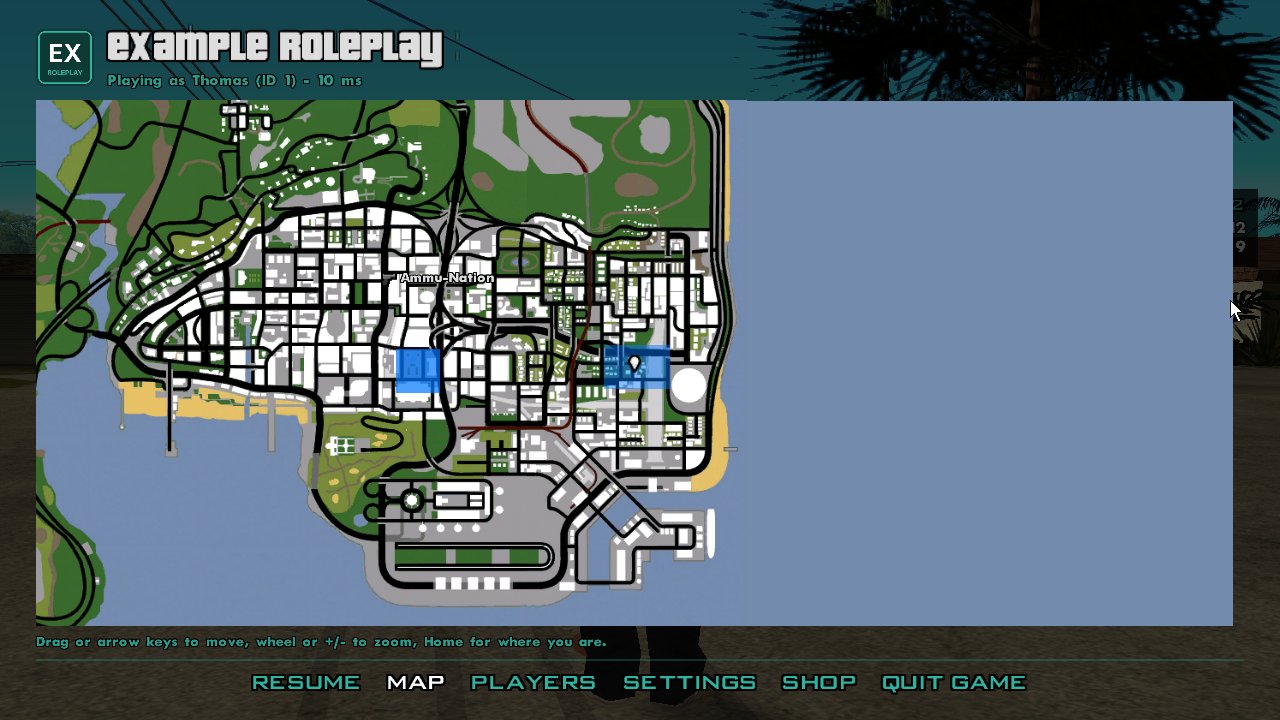
The script's own markers and overlays on the pause menu's map, apart from
the gamemode's (server.map, player.map). They're
cleared when scripts reload.
Ids are 1-32 characters. Colours are 0xRRGGBBAA or "#RRGGBB[AA]".
sagl.map.setMarker(id, options)
sagl.map.setMarker(id: string, options: {
  x: number; y: number; icon?: number; color?: string | number; label?: string;
}): void
Adds a marker, or moves the one with that id.
| Parameter | Type | Description |
|---|---|---|
id |
string |
Its id. |
options.x, options.y |
number |
Where, in world coordinates. |
options.icon |
number |
The game's radar sprite, 1-63. 0 or left out: a diamond in color. |
options.color |
string | number |
For the diamond. Default white. |
options.label |
string |
Shown beside it (up to 48 characters). |
Throws RangeError for a bad id; TypeError for a bad colour.
sagl.map.removeMarker(id)
sagl.map.setOverlay(id, options)
sagl.map.setOverlay(id: string, options: {
  x1: number; y1: number; x2: number; y2: number;
  file?: string; image?: string; opacity?: number; layer?: number;
}): boolean
Puts an image over a world rectangle, or replaces the one with that id.
| Parameter | Type | Description |
|---|---|---|
options.x1, y1, x2, y2 |
number |
Two opposite corners. |
options.file |
string |
A client file (PNG or JPEG). |
options.image |
string |
Or base64, or a data: URI (up to 12 MB). |
options.opacity |
number |
0-1, default 1. |
options.layer |
number |
Higher draws on top. Default 0. |
Returns whether the image loaded.
Throws ReferenceError if file isn't a client file.
sagl.map.setOverlay("turf", { x1: 2400, y1: -1750, x2: 2550, y2: -1600, file: "maps/turf.png", opacity: 0.6 });
sagl.map.removeOverlay(id)
sagl.map.setWorld(visible, background?)
Shows or hides the game's own map.
| Parameter | Type | Description |
|---|---|---|
visible |
boolean |
false hides it. |
background |
string | number |
What shows instead. Default black. |
// Indoors: only the floor plan.
sagl.map.setWorld(false, "#000000");
sagl.map.setOverlay("floor", { x1: -30, y1: -30, x2: 30, y2: 30, file: "maps/bank-interior.png" });
A map in your own UI: <sagl-map>
The pause menu's map is an element any document can use: <sagl-map/>. It
shows the same markers, overlays and server blips. Give it a size; it fills
it.
With mode="radar" it's a radar, like GTA V's minimap. It follows the
player, blips further away sit on its edge pointing their way (not
short-range ones, such as shop icons: those only show in range), and north
sits on the edge too. The player can't drag or zoom it, and markers'
labels don't show on it. Inside an interior it's black, as the game's
radar is: no world or gang zones, only overlays and blips. While the server hides
the radar (player.hud.set({ radar: false }), or the whole HUD), it's hidden too.
| Attribute | Default | |
|---|---|---|
mode |
(none) | "radar" for a radar; otherwise a map like the pause menu's. |
range |
220 |
Metres shown from top to bottom (50-3000). |
rotate |
"camera" |
What's up the screen: "camera" (the way the camera looks), "heading" (the way the player, or their vehicle, faces) or "north". |
pivot |
"0.5 0.62" |
Where the player is: "x y" as fractions of its width and height, or one number for the height. "0.5 0.5" centres them. |
speed-zoom |
"on" |
"off": no zooming out as they drive faster. |
icon-size |
7 (radar), 9 |
Half a blip's size, in dp. North and the player's arrow are a little bigger. This also applies to the pause menu style map. |
Shape: it follows the element's border-radius, so the map, blips and
north all keep to the rounded outline. For a round radar, give it equal
width and height and a radius of half that. Each corner can be different.
// A round, north-up radar, the player in the middle.
`<sagl-map mode="radar" rotate="north" pivot="0.5 0.5" speed-zoom="off"
   style="display: block; width: 12vw; height: 12vw; border-radius: 6vw;"/>`
sagl.hud.set({ radar: false, health: false, armour: false });  // the game's own off
const hud = sagl.ui.open(`<rml><head><link type="text/rcss" href="/sagl/ui/theme/base.rcss"/>
  <style>
    body { position: absolute; left: 1.5vw; bottom: 2.5vw; width: 16vw; }
    sagl-map { display: block; width: 100%; height: 10vw; }
  </style></head>
  <body><sagl-map mode="radar" range="300"/></body></rml>`, { input: false });
Freeroam's client-files/scripts/hud.js is a whole GTA V style HUD built
this way, with the health and armour bars under the radar.